本文最后更新于 574 天前,其中的信息可能已经有所发展或是发生改变。
前言
在制作一个生成发货单图片的python程序时,html的生成没有问题,但是当转换为pdf或jpg时出现中文乱码的问题
解决方案
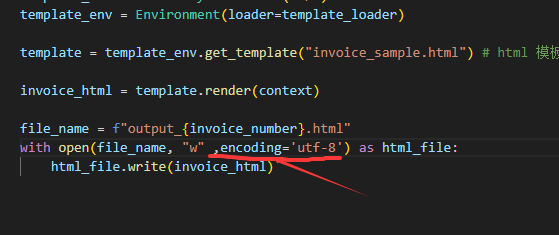
1.在根据模板html渲染后写入输出的html到新文件时,字符编码要设置encoding='utf-8'
2.在模板html加上meta标签
<meta charset="utf-8">,且要确保电脑上安装了SimSun(宋体)字体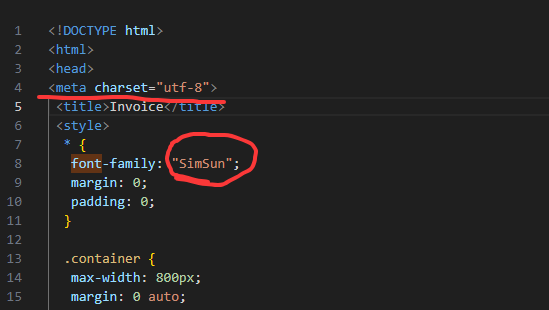
相关代码
渲染代码:
# file: render_html.py
# 把 json 数据写入到 html 里面,进行渲染,输出实际数据的 html
from jinja2 import FileSystemLoader, Environment

# 参考来源
# https://dboostme.medium.com/how-to-generate-invoices-using-python-playwright-d77839af4b1e

# 实际上,下面这个教程写的很不错!
# https://practicalpython.yasoob.me/chapter3

invoice_number = 1
import datetime
now = datetime.datetime.now()
formatted_datetime = now.strftime("%Y-%m-%d %H:%M:%S")

context = {
    "invoice_number": invoice_number,
    "invoice_header": "中文",
    "amount": 10,
    "currency": "USD",
    "account": "account_id",
    "account_iban": "account_iban",
    "swift": "account_swift",
    "work_description": "Delivering pizza on motorbike",
    "person": "James Bond",
    "email": "james@bond.mi6",
    "phone": "+4476898123428",
    "billed_to": "MI-6",
    "billed_to_address": "85 Albert Embankment",
    "payment_received_date": formatted_datetime
}

# 整体的逻辑是: 找个模板文件,用 jinja2 渲染数据,输出 html 文件

template_loader = FileSystemLoader("./")
template_env = Environment(loader=template_loader)

template = template_env.get_template("invoice_sample.html") # html 模板文件

invoice_html = template.render(context)

file_name = f"output_{invoice_number}.html"
with open(file_name, "w" ,encoding='utf-8') as html_file:
    html_file.write(invoice_html)
html转jpg
import imgkit

path_wkimg = r"D:\wkhtmltopdf\bin\wkhtmltoimage.exe"  # 工具路径
cfg = imgkit.config(wkhtmltoimage=path_wkimg)
#可以修改参数,图片大小、语言等
options = {
    'custom-fonts-dir': r'CC:\Users\beizhi\AppData\Local\Microsoft\Windows\Fonts\SimSun.ttf',  # 指定字体文件目录

}
# 将html文件转为图片
imgkit.from_file('output_1.html', 'hellotable.jpg', config=cfg)
模板代码 invoice_sample.html
<!DOCTYPE html>
<html>
<head>
<meta charset="utf-8">
 <title>Invoice</title>
 <style>
  * {
   font-family: "SimSun";
   margin: 0;
   padding: 0;
  }

  .container {
   max-width: 800px;
   margin: 0 auto;
   padding: 20px;
   border: 1px solid #ccc;
  }

  table {
   width: 100%;
   border-collapse: collapse;
  }

  h2 {
   margin-bottom: 50px;
   text-align: center;
  }

  th, td {
   padding: 10px;
   text-align: left;
   border-bottom: 1px solid #ccc;
  }

  .invoice-details {
   margin-bottom: 20px;
   text-align: left;
  }

  .invoice-details p {
   margin: 0;
   font-size: 16px;
  }

  .invoice-details strong {
   font-weight: bold;
  }

  .invoice-items {
   margin-top: 60px;
   margin-bottom: 20px;
  }

  .invoice-items th {
   font-weight: bold;
   text-align: left;
  }

  .invoice-items td {
   text-align: left;
  }

  .invoice-total {
   text-align: right;
   margin-right: 30px;
  }

  .invoice-total strong {
   font-size: 20px;
   font-weight: bold;
  }

  .bottom {
   margin-top: 40px;
   text-align: right;
  }

  .info {
   margin-top: 60px;
  }

  .signature {
   width: 200px;
   height: auto;
  }

  @media print {
   .container {
    border: none;
   }
  }

 </style>
</head>
<body>
<br>
 <div class="container">
  <h2>{{ invoice_header }}</h2>

  <div class="invoice-details">
   <p><strong>Invoice number:</strong> {{ invoice_number }}</p>
   <p><strong>Date:</strong> {{ payment_received_date }}</p>
   <p><strong>Billed to:</strong> {{ billed_to }}</p>
   <p><strong>Address: </strong> {{ billed_to_address }}</p>
  </div>

  <div class="invoice-items">
   <table>
    <thead>
     <tr>
      <th>Description</th>
      <th>Amount</th>
      <th>Currency</th>
     </tr>
    </thead>
    <tbody>
     <tr>
      <td>{{ work_description }}</td>
      <td>{{ amount }}</td>
      <td>{{ currency }}</td>
     </tr>
    </tbody>
   </table>
  </div>

  <p class="info">
   Paid in {{ currency }} to {{ person }},
   IBAN <strong>{{account_iban}}</strong>,
   SWIFT <strong>{{ swift }}</strong>
  </p>

  <div class="invoice-details bottom">
   <p><strong>{{ person }}</strong></p>
   <p><strong>Email:</strong> {{ email }}</p></p>
   <p><strong>Phone:</strong> {{ phone }}</p>
  </div>
 </div>
 <br>
</body>
</html>
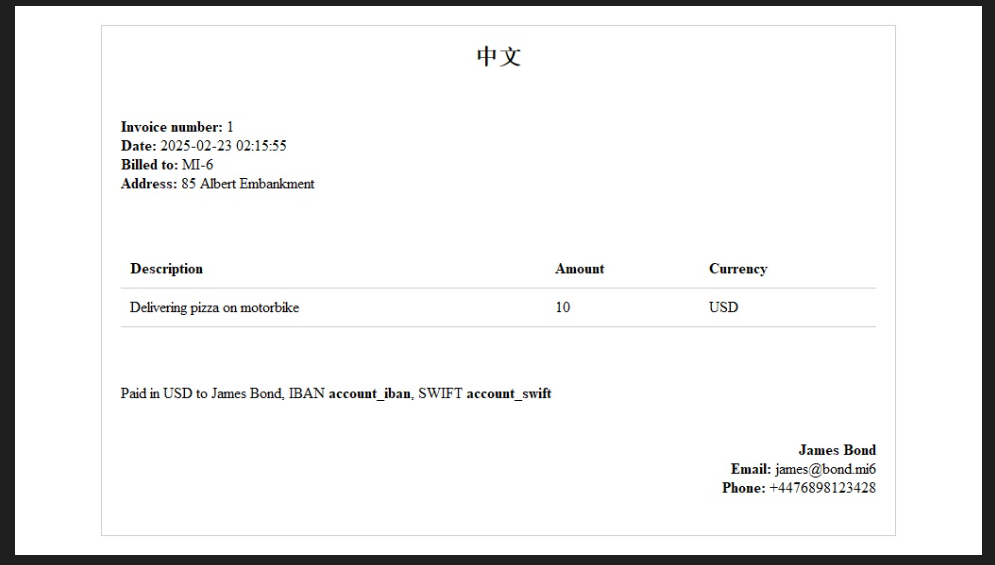
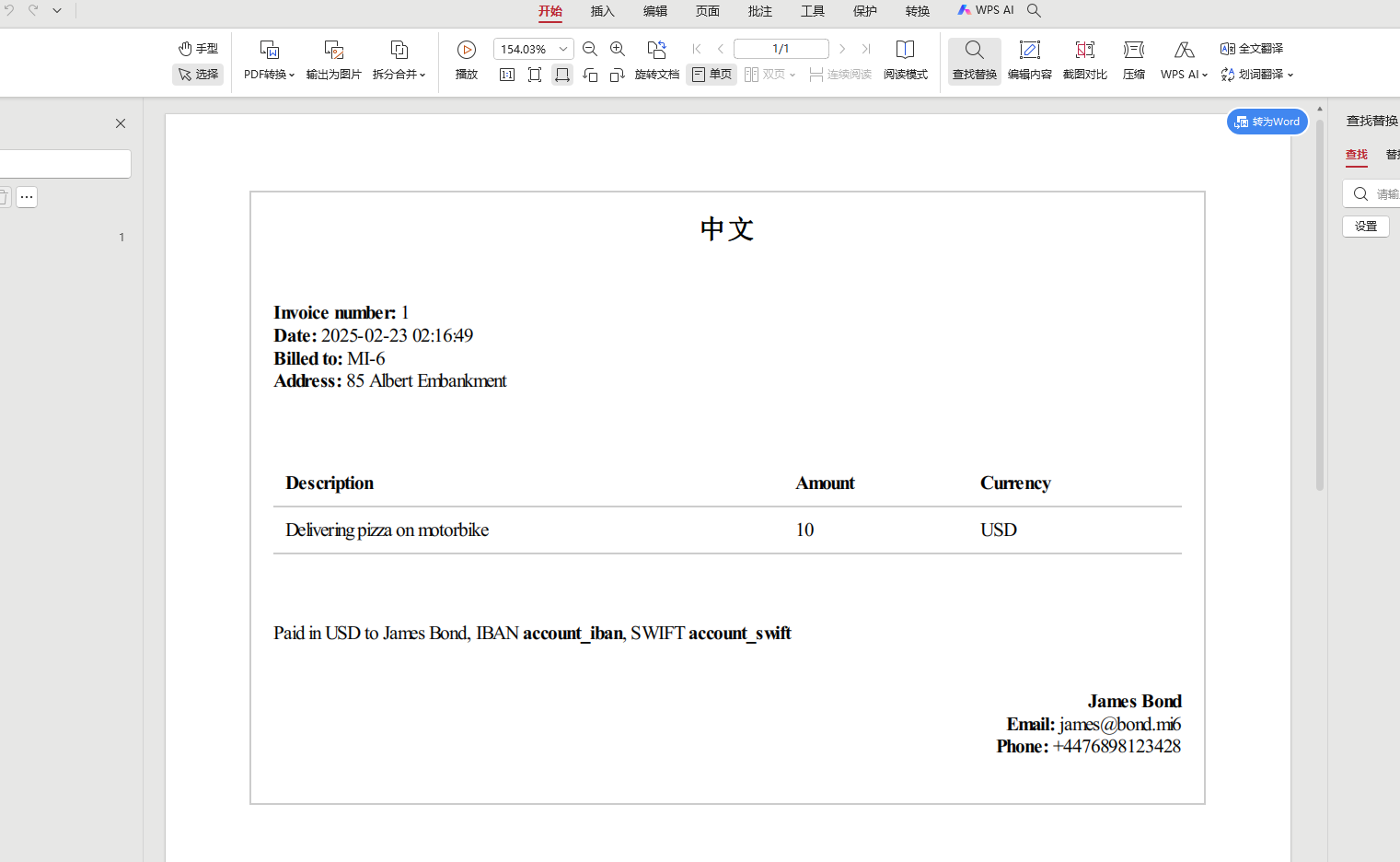
效果图片
图片